K's Website

やっほ~! I am a general software developer and electronics enthusiast.
Feel free to check out my projects, or consoles page.
Destiny2DPSGraphPY
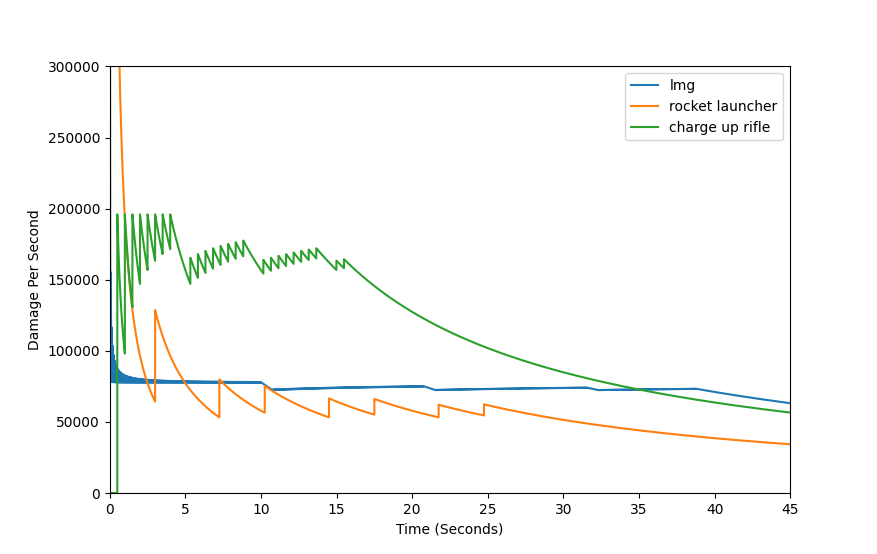
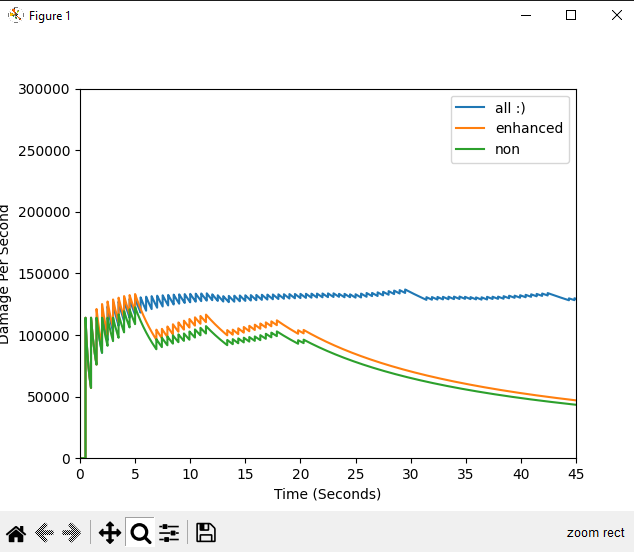
Description: Destiny2DPSGraphPY is a command-line program that helps users input and simulate the DPS over time of various weapons in Destiny 2. The program can read weapon data from a JSON file or accept input through the command line. If inputting through the command line, the user is prompted to provide the weapon name and other various data. Once the weapon data is collected, the program calculates the DPS over time and plots it on a graph using Matplotlib. The resulting graph represents the DPS over time for the given weapon, taking into account reload times and other factors. The user can then compare the graphs of different weapons to determine which has the highest DPS over time.
1. Why DPS over time?
Measuring DPS over time can give a more accurate representation of sustained damage output over an extended period, which is important in many scenarios such as boss fights with phases, where the goal is to deal a certain amount of damage within a fixed time frame. A DPS average, on the other hand, can be skewed by burst damage or moments of low activity, and may not reflect the damage output in a given encounter accurately.
This is intended to be automation of an already existing style of graph used by the Destiny 2 community. The key difference is that usually, these graphs are done by manually keeping track of data points, and then plotting by hand. Automation is the key here.
2. Explanation of the code
I will explain parts, but not all of, the code. Make sure you visit the repository itself to check out the code on your own. It is highly likely that my explanations will quickly go out of date, as this is an actively worked on code repository. It might fundamentally change after the date that I am writing this (currently Feb 20, 2023).
https://github.com/katzerax/Destiny2DPSGraphPY
Let’s start with the arguments.
The below code will show how we utilize command line arguments to set up the program in different ways.
agp = argparse.ArgumentParser()
agp.add_argument("-im", "--input-mode", default="file", choices=["file", "cli"], type=str, help="mode for inputting data. options: 'file' or 'cli'. default: 'file'")
agp.add_argument("-rf", "--read-file", default="weapons.json", type=str, help="file of weapon information to read. default: weapons.json")
agp.add_argument("-d", "--dialogue", default="y", choices=["y","n"], type=str, help="beginner friendly dialogue to choose between input modes. options: 'y' or 'n'. default: 'y'")

args = agp.parse_args()
As you can see, currently we have 3 main potential arguments, those being input-mode, read-file, and dialogue. With input mode you can choose to specifically skip everything else and just run from a pre-set json file. This can be useful especially in the circumstance of sharing json files with other people. You can choose to use a different json file than “weapons.json” using the read-file argument. The program runs with user friendly dialogue, so disabling that with the respective argument is possible, and useful for more advanced users, who may be running the program over and over.
Next up I will display how the program uses those arguments to initialize, and run through the basics, of the program itself.
if args.dialogue == "y":
    print("*Note: this dialogue can be toggled off using '-d n' or '--dialogue n' from the command line")
    choice = ""
    while choice not in ("cli", "file"):
        choice = input("Choose an input mode:\n\tcli - input weapon information via command line\n\tfile - input weapon information via the 'weapons.json' file\n")
    args.input_mode = choice

if args.input_mode == "cli":
    # Initialize list to store weapon dictionaries
    weapons = []
    perk = 0
    perks = []
    # Loop to input weapon data
    while True:
        # Input weapon data
        perks = []
        perk = 0
        weapon = {}
        weapon["name"] = input("Enter weapon name: ")
        weapon["fire_rate"] = float(input("Enter Rounds Per Minute: "))
        weapon["reload_time"] = float(input("Enter reload time: "))
        weapon["damage_per_shot"] = float(input("Enter damage per shot: "))
        weapon["magazine_capacity"] = int(input("Enter magazine capacity: "))
        weapon["ammo_reserve"] = int(input("Enter ammo reserve: "))
        weapon["delay_first_shot"] = bool(int(input("Enter whether to delay the first shot (1 - true, 0 - false): ")))
        weapon["add_perks"] = bool(int(input("Enter whether to apply perks (1 - true, 0 - false): ")))

        if weapon["add_perks"] == True:
            weapon["enhanced_perks"] = bool(int(input("Assume all perks are enhanced? (1 - true, 0 - false): ")))
            weapon["weapon_class"] = int(input("Weapon Ammo Type (1 - Primary, 2 - Special, 3 - Heavy): "))
            print("Enter a perk from the following list to add:\n1) Triple Tap\n2) Fourth Time's\n3) Veist Stinger\n4) Clown Cartidge\n5) Overflow\n6) Rapid Hit\n7) Vorpal Weapon\n8) Focused Fury\n9) High Impact Reserves\n10) Firing Line\n11) Explosive Light\n12) Cascade Point\n13) Explosive Payload\nEnter -1 to Stop\n")
            teehee = 0
            while(perk!=-1):
                teehee += 1
                [print("Perk", teehee)]
                perk = int(input("input: "))
                if((perk!=-1) and ((perk>=1) and (perk<=13))): #change upper bound with new perks
                    perks.append(perk)
            weapon["perks"] = perks

        # Add weapon to list
        weapons.append(weapon)

        # Check if user wants to add more weapons
        add_more = input("Add more weapons? (y/n) ")
        if add_more.lower() != "y":
            break

    # Write weapons data to JSON file
    with open(args.read_file, "w") as f:
        json.dump({"weapons": weapons}, f)
You can see here that by default, it will use the user friendly dialogue, and start to create a dictionary for the weapon information that it then intends to write to the json file.
Below is the main loop that is the backbone of the program. It is responsible for the primary math.
    for i in range(data_points):
        #perks
        shot_dmg_output = damage_per_shot
        fire_delay = round(60/fire_rate, roundingcoeff)
        output_reload_time = round(reload_time, roundingcoeff)
        if TT_On: #1
            shots_left_mag, shots_left_reserve, tt_delay, tt_delay_check = TripleTap(shots_fired,shots_left_mag,shots_left_reserve,tt_delay,tt_delay_check)
        if FTTC_On: #2
            shots_left_mag, shots_left_reserve, fttc_delay, fttc_delay_check = FTTC(shots_fired,shots_left_mag,shots_left_reserve,fttc_delay,fttc_delay_check)
        if VS_On: #3
            shots_left_mag, veist_check = VeistStinger(shots_fired,shots_left_mag,magazine_capacity,veist_overflow_cross,veist_check)
        if CC_On: #4
            clown_check, shots_left_mag = ClownCartridge(magazine_capacity, shots_left_mag, clown_check, reload_count)
        if OF_On: #5
            shots_left_mag, of_check, veist_overflow_cross = Overflow(shots_left_mag,of_check,delay_first_shot,veist_overflow_cross,magazine_capacity)
        if RH_On: #6
            if shots_left_mag == 0:
                output_reload_time = RapidHit(output_reload_time,rh_stacks,shots_fired,roundingcoeff)
        if VW_On: #7
            shot_dmg_output = VorpalWeapon(weapon_class,shot_dmg_output)
        if FF_On: #8
            shot_dmg_output, FFActive, ff_time_check, shots_fired_ff = FocusedFury(FFActive,shots_fired_ff,magazine_capacity,time_elapsed,shot_dmg_output,ff_time_check)
        if HIR_On: #9
            if enhanced_perks == 1:
                shot_dmg_output = HIREnhanced(shots_left_mag,magazine_capacity,shot_dmg_output)
            else:
                shot_dmg_output = HighImpactReserves(shots_left_mag,magazine_capacity,shot_dmg_output)
        if FL_On: #10
            shot_dmg_output = FiringLine(shot_dmg_output)
        #if EL_On: #11
        if CasP_On: #12
            fire_delay = CascadePoint(fire_delay,roundingcoeff,fire_rate,cascade_fr)
        if EP_On: #13
            shot_dmg_output = ExplosivePayload(shot_dmg_output)

        #weapon firing
        if shots_left_reserve == 0:
            total_damage = total_damage
        elif shots_left_mag == 0:
            next_fire += output_reload_time
            next_fire -= fire_delay if delay_first_shot == 0 else 0
            next_fire = round(next_fire, roundingcoeff)
            shots_fired = 0
            reload_count += 1
            shots_left_mag = magazine_capacity
        elif time_elapsed == next_fire:
            total_damage += shot_dmg_output
            next_fire += fire_delay
            next_fire = round(next_fire, roundingcoeff)
            shots_fired += 1
            shots_fired_ff += 1
            shots_left_mag -= 1
            shots_left_reserve -= 1
        time_elapsed += x_increments
        time_elapsed = round(time_elapsed, roundingcoeff)

        t_dmg.append(total_damage)
As you can see total damage is an array, which being utilized with the time array, is then put into a new array, essentially deriving the current DPS over time.
3. Additional Credits
4. Example Graphs